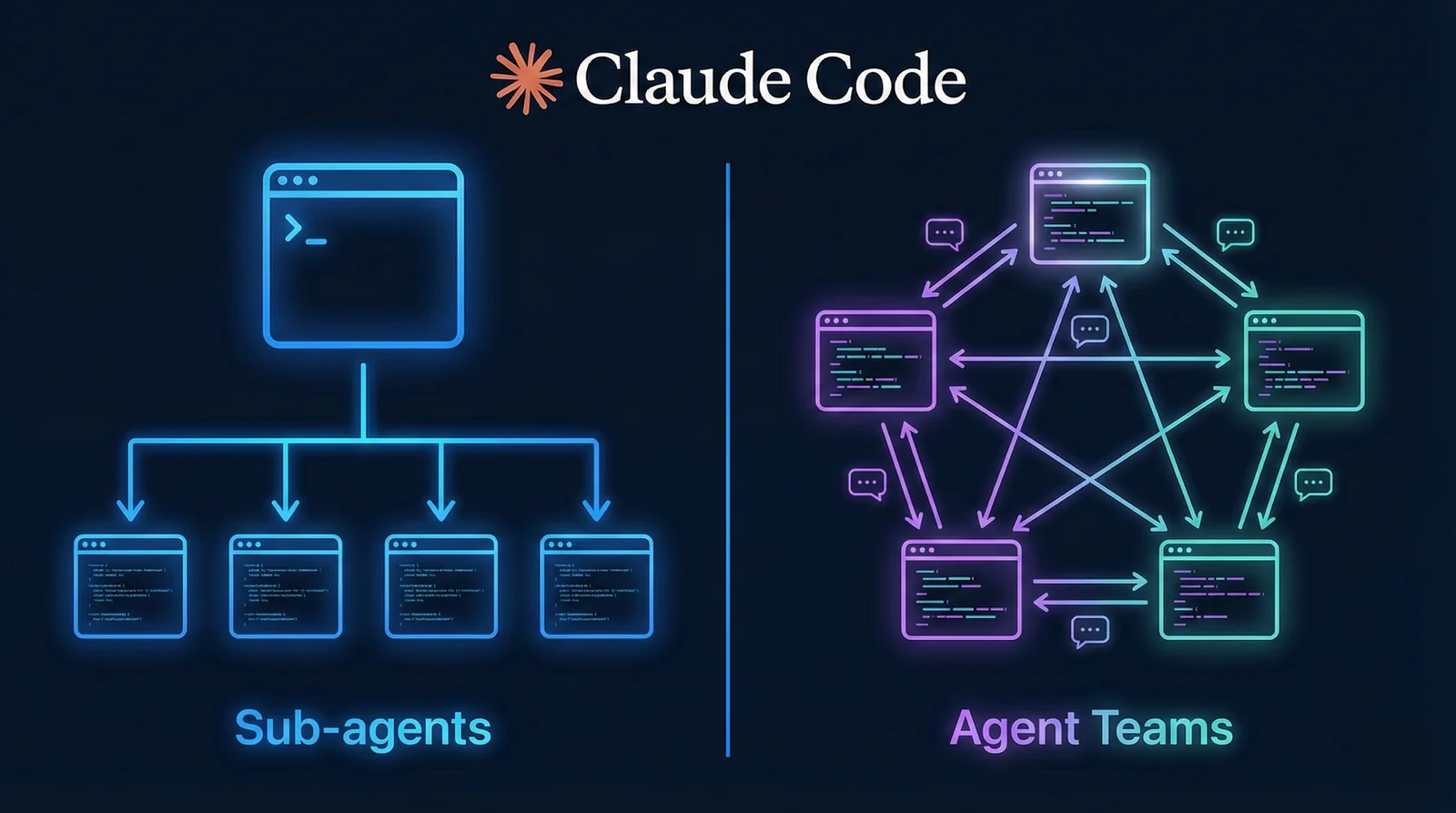
5 agents running in parallel. One reviews security, one checks performance, one runs tests. Nicholas Carlini from Anthropic ran 16 parallel agents that built a C compiler in 100,000 lines of Rust - it compiles Linux kernel 6.9 and passes 99% of GCC torture tests. Cost: ~$20,000 in API calls. On smaller tasks, results are more modest - @the_ai_architect tried it on 1.7K lines and got a total failure.
Claude Code launched Agent Teams on February 5, 2026, alongside Opus 4.6. Multiple Claude Code instances work in the same session and communicate directly. Don’t confuse with subagents (Task tool) - those only report back to the main agent. I put this guide together from Anthropic docs, Telegram channels, and other people’s failures - though docs and real-world cases sometimes contradict each other.
How Agent Teams Work
One instance is the Team Lead. It coordinates, assigns tasks, and synthesizes results. The rest are Teammates - each with their own context window and focus area. Honestly, I expected the setup to be more complex. It’s one environment variable.
The key difference from subagents: teammates communicate directly with each other. A subagent only reports to the main agent. A teammate can message another - “hey, my API contract changed, update your side.”
Enable it with one line in settings.json:
{
  "env": {
    "CLAUDE_CODE_EXPERIMENTAL_AGENT_TEAMS": "1"
  }
}
New capabilities unlock after that:
- Shift+Down - switch between teammates in the same terminal
- Split panes - via tmux or iTerm2, see everyone at once
- Shift+Tab - Delegate mode, where the lead only coordinates, doesn’t write code itself. According to claudefa.st, Delegate mode + explicit file boundaries in the spawn prompt eliminate most common Agent Teams mistakes
- Plan Approval - teammate works in read-only until the lead approves the plan
Tasks go through a cycle: pending, in progress, completed. Dependencies work too - teammate B won’t start until A finishes.
Subagents vs Agent Teams - When to Use Which
| Subagents (Task tool) | Agent Teams | |
|---|---|---|
| Context | Own, result returned to caller | Own, fully independent |
| Communication | Only with main agent | Directly between teammates |
| Coordination | Main agent controls everything | Shared task list + self-coordination |
| Better for | Focused tasks, just need the result | Complex work, need discussion |
| Tokens | Less: result is summarized | More: each teammate = separate instance |
Subagents are workers who go off and bring back a result.
Agent Teams are a team that discusses, debates, and coordinates.
Prompts
CLI tool research:
I'm designing a CLI tool that helps developers track TODO comments
across their codebase. Create an agent team to explore this from
different angles: one teammate on UX, one on technical architecture,
one playing devil's advocate.
Code review PR:
Create an agent team to review PR #142. Spawn three reviewers:
One focused on security implications,
One checking performance impact,
One validating test coverage.
Have them each review and report findings.
Debug with a scientific approach:
Users report the app exits after one message instead of staying
connected. Spawn 5 agent teammates to investigate different
hypotheses. Have them talk to each other to try to disprove
each other's theories, like a scientific debate.
With context for a specific teammate:
Spawn a security reviewer teammate with the prompt: "Review the
authentication module at src/auth/ for security vulnerabilities.
Focus on token handling, session management, and input validation."
What the Community Says
Three cases from Telegram.
@ilia_izmailov (3,360 views) - breaks the task into 5 subtasks. Each gets a coder and a reviewer. Above them - a tech lead that double-checks everything.
@alxyrgin (1,380 views) - three reasons to split roles. Accuracy: each agent goes deep into its own area. Conflict: developer argues with security engineer and QA - quality goes up. Context: less context per agent means more attention to detail. Also - agents aren’t just for developers, you can assemble a product manager, UX researcher, and critic.
@the_ai_architect (5,350 views - most liked) - tried Agent Teams on a TG mini app. 1.7K lines, 3 backends + frontend. Result: failure. Backend fell out of sync with frontend, contracts drifted, instructions got ignored. GPT-5.3 Codex solo performed better. This one stuck with me the most - 5,350 views and the main takeaway: “A conscious process of planning, decomposition, and verification is still what matters.”
Cole Medin on YouTube said something similar: “Throw a vague prompt at Agent Teams and you’re guaranteed to get a mess.”
5 Reasons to Split Roles
Detailed breakdown from @tired_glebmikheev - why separate roles outperform a single agent:
- Focus - one agent on security + performance + architecture = first thing ok, the rest missed. Separate agents dig deeper
- Conflict - developer vs security engineer vs QA in debate, and the review result is noticeably more accurate than one agent “reviewing itself”
- Context window - less context = more attention to detail on each task
- Pattern convergence - decades of org structures (stories, DoR/DoD, roles) apply to agents. Conway’s Law in reverse
- Quality - want designer feedback on every analysis + a QA test plan = separate roles
His conclusion: “Design the process, responsibilities, requirements, guidelines - and accumulate successful decisions and practices.”
Best Practices
- 3-5 teammates - optimal. More = coordination chaos
- 5-6 tasks per teammate - don’t overload
- Avoid file conflicts - two teammates in the same file = merge hell
- Quality gates - TeammateIdle and TaskCompleted hooks for control
- Subscription - at minimum the Max plan: tokens burn 3-4x faster. Max at $100/month is manageable, $200/month is comfortable. On Pro you risk hitting the limit after a couple of sessions
What I Learned
The feature is experimental - there are limitations worth knowing before you start. If you close the terminal or Claude Code crashes, teammates don’t recover. /resume brings back only the lead, and you’ll have to spawn teammates again from scratch. One session = one team, you can’t run two in parallel. Nesting doesn’t work - a teammate can’t spin up its own sub-team. For example, if the architect teammate wants to delegate work to three more agents - no luck, only the original team creator can spawn new ones. And you can’t swap the coordinator mid-session either.
Code review, research from multiple angles, refactoring independent modules - this is where the team wins. On tasks with tightly coupled components (frontend + backend sharing contracts) a single agent works better. Agent Teams shine where tasks are parallel and loosely connected.
Not sure yet that Agent Teams replace well-configured subagents and skills for most tasks - I’m just starting to try them on real projects.
Sources
- Anthropic - Agent Teams Documentation
- Anthropic Engineering - Building a C Compiler with Agent Teams
- alexop.dev - From Tasks to Swarms: Agent Teams in Claude Code
- claudefa.st - Agent Teams Best Practices
- Cole Medin - Agent Teams Live Build (YouTube)
- @ilia_izmailov - Telegram
- @alxyrgin - Telegram
- @the_ai_architect - Telegram
- @tired_glebmikheev - 5 reasons for separate agent roles